
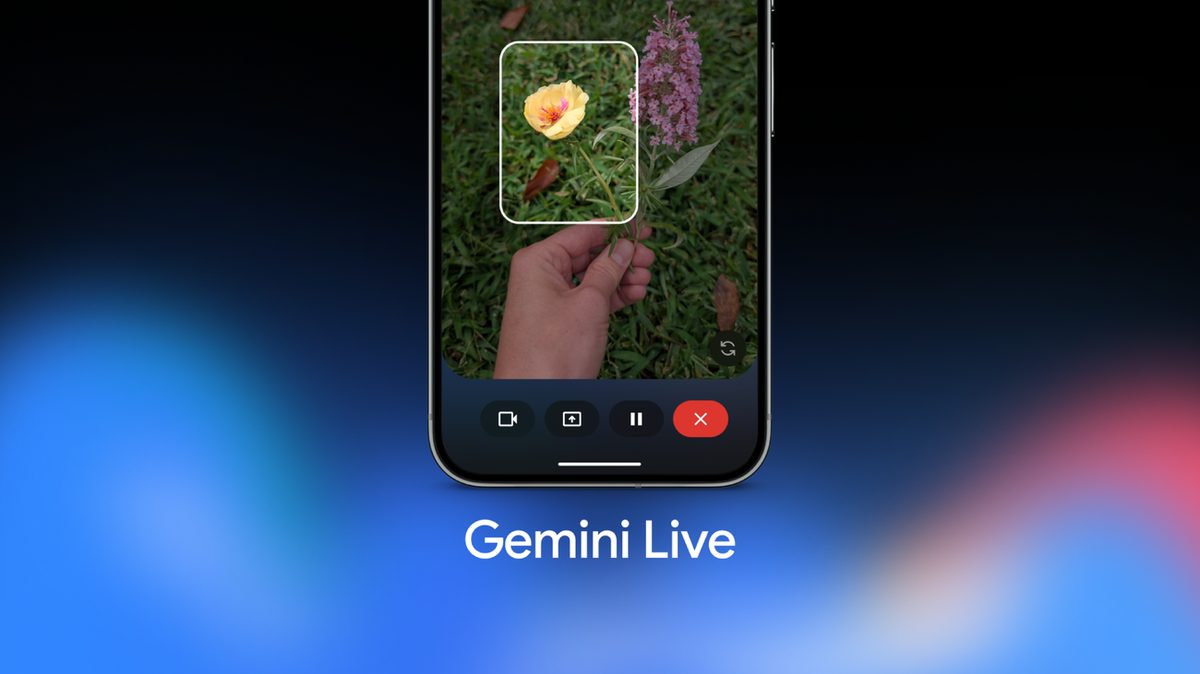

Google is enhancing Gemini Live with visual overlays that highlight objects in your camera feed and a new audio model for more expressive conversations. The visual overlay feature helps you identify items or get advice by placing a white-bordered rectangle around objects in your camera’s view. The new native audio model is designed for more responsive and expressive conversations.
At last year’s Made by Google event, Google unveiled Gemini Live, a feature designed for more natural, hands-free conversations with its AI chatbot. Since its debut, Google has introduced numerous upgrades to Gemini Live, most notably the ability to share your camera feed and screen.
Google announced a major enhancement to Gemini Live’s camera-sharing capabilities and a new audio model to make interactions even more natural.
During its presentation on the new Google Pixel 10 series, Google detailed several improvements coming to Gemini Live on Android. First, when you share your camera feed, Gemini Live will be able to display visual overlays to highlight specific objects. These highlights appear as a white-bordered rectangle around an object, while the rest of the view is slightly dimmed to make it stand out.
This “visual guidance” feature is designed to help you quickly locate and identify items in your camera’s view. For instance, you could use it to highlight the correct button on a machine, point out a specific bird in a flock, or identify the right tool for a project. You can also use it for advice, like asking Gemini to recommend the right pair of shoes for an occasion.
The feature can also handle more complex scenarios. In a briefing, a Google product manager shared a personal example from a recent international trip. He was struggling to figure out if he could park in a certain spot, unable to make sense of the foreign-language signs, road markings, and local regulations. After pulling out his phone and opening Gemini Live, he pointed his camera at the scene and asked if parking was allowed. Gemini looked up the local rules, translated the signs, and then highlighted a spot on the street where he could park for free for the next two hours.
Visual guidance in Gemini Live will be available out of the box on the Google Pixel 10 series and will start rolling out to other Android devices next week. The feature will expand to iOS devices in the coming weeks. A Google AI Pro or Ultra subscription will not be required.
Alongside the visual overlays, Google is upgrading Gemini Live with a new native audio model designed for more responsive and expressive conversations.
First, this new model will respond more appropriately to what you say. For example, if you’re chatting about a stressful topic, it’ll respond with a calmer, more “measured” voice.
Google says that you’ll also be able to control how the new audio model speaks to you. If you’re having trouble keeping up with what Gemini is saying, for instance, you can ask it to speak more slowly. Or if you’re in a hurry, you can ask it to speed things up.
Lastly, you can even get it to tell you a dramatic story from the perspective of a historical figure. “Ask Gemini to tell you about the Roman empire from the perspective of Julius Caesar himself, and get a rich, engaging narrative complete with character accents,” Google says in its blog post.
Gemini Live’s new visual overlays feature is better suited for Android XR glasses, but it’s nice to have it available now on mobile since we’re still quite a bit away from getting our hands on those glasses.
This article was updated at 7:50 PM ET to correct the section on the natural audio model as well as add demo assets from Google’s blog post.




