


TechBriefly
  • Tech
  • Business
  • Crypto
  • Science
  • Geek
  • How to
  • About
    • About TechBriefly
    • Terms and Conditions
    • Privacy Policy
    • Contact Us
    • Languages
      • 中文 (Chinese)
      • Dansk
      • Deutsch
      • Español
      • English
      • Français
      • Nederlands
      • Italiano
      • 日本语 (Japanese)
      • 한국인 (Korean)
      • Norsk
      • Polski
      • Português
      • Pусский (Russian)
      • Suomalainen
      • Svenska
No Result
View All Result
TechBriefly
Home Tech AI
Copilot Vision now reads your entire desktop screen

Copilot Vision now reads your entire desktop screen

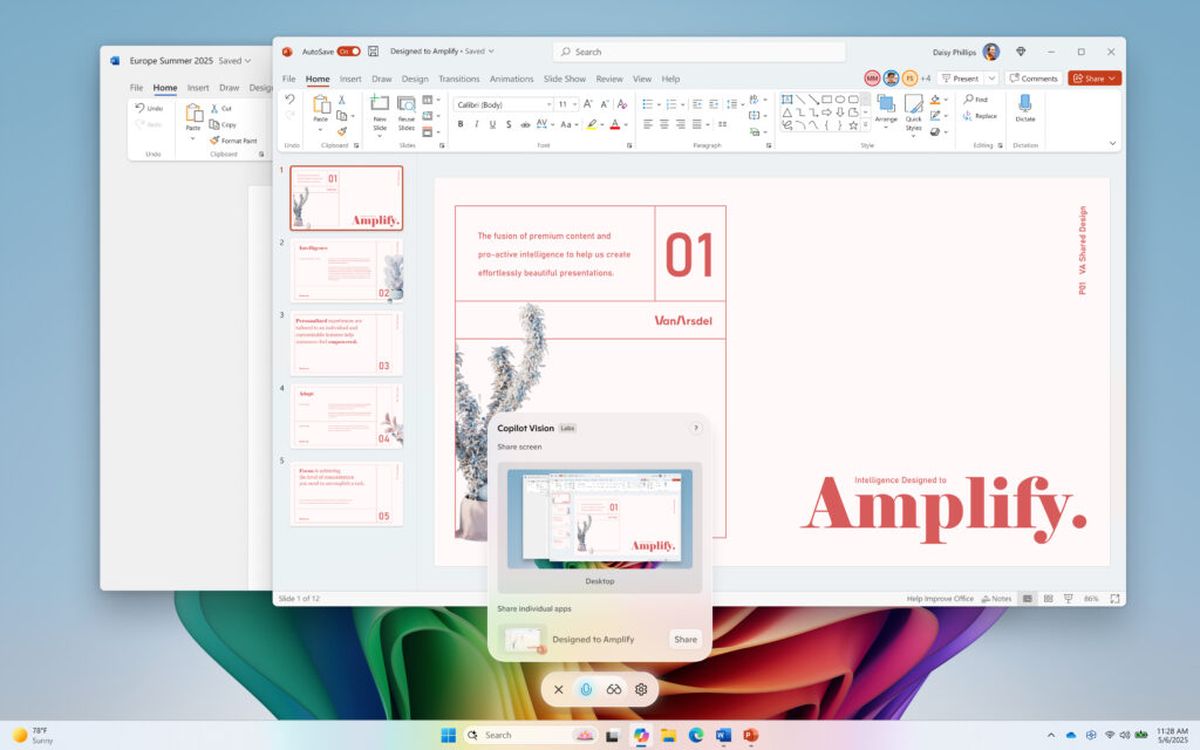
Users activate the feature by clicking a glasses icon within the Copilot app and selecting which desktop or window they want the AI to view.

Aytun ÇelebibyAytun Çelebi
16 July 2025
in AI, Tech
Reading Time: 1 min read
Share on FacebookShare on Twitter

Microsoft is rolling out a significant update to Copilot Vision for Windows Insiders, enabling the AI tool to analyze entire desktop screens. Previously limited to two applications, this enhancement allows Copilot Vision to view “your whole desktop or any specific browser or app window,” according to Microsoft.
Copilot Vision now reads your entire desktop screen
Image: Microsoft

Unlike the automatic snapshotting of Recall, Copilot Vision operates similarly to screen sharing, activated by clicking a glasses icon in the Copilot app. Microsoft states it can “help analyze content, provide insights, and answer your questions, coaching you through it aloud.” Potential applications include offering “tips on making improvements to your creative project, help with improving your resume, or guidance while navigating a new game.”

Copilot Vision’s capabilities are expanding, having initially been tested last year for web browsing in Edge and also supporting analysis via mobile phone cameras.

Tags: copilot visionfeaturedMicrosoft
ShareTweet
Aytun Çelebi

Aytun Çelebi

Starting with coding on Commodore 64 in elementary school moving to web programming in his teenage years, Aytun has been around technology for over 30 years, and he has been a tech journalist for over 20 years now. He worked in many major Turkish outlets (newspapers, magazines, TV channels and websites) and managed some. Besides journalism, he worked as a copywriter and PR manager (for Lenovo, HP and many international brands ) in agencies. He founded his agency, Linkmedya in 2019 to execute his way of producing content. He is recently interested in AI, automation and MarTech.

Related Posts

New WhatsApp update brings 2026 stickers and video call effects

New WhatsApp update brings 2026 stickers and video call effects

30 December 2025
Leaker reveals Xiaomi plans for high end eSIM device in 2026

Leaker reveals Xiaomi plans for high end eSIM device in 2026

30 December 2025
HP prepares OMEN OLED monitor reveal for CES 2026

HP prepares OMEN OLED monitor reveal for CES 2026

30 December 2025
High RAM costs from AI boom could delay next Xbox and PlayStation

High RAM costs from AI boom could delay next Xbox and PlayStation

30 December 2025

LATEST

New WhatsApp update brings 2026 stickers and video call effects

Leaker reveals Xiaomi plans for high end eSIM device in 2026

HP prepares OMEN OLED monitor reveal for CES 2026

High RAM costs from AI boom could delay next Xbox and PlayStation

LG to unveil its Gallery TV at CES 2026

Bitcoin drops 3% to $87,300 as altcoins decline

How to install mods and custom content in The Sims 2

Running Python files and fixing path errors on Windows

How to boot your PC into Command Prompt for troubleshooting

How to delete a virus using Command Prompt

TechBriefly

© 2021 TechBriefly is a Linkmedya brand.

  • Tech
  • Business
  • Science
  • Geek
  • How to
  • About
  • Privacy
  • Terms
  • Contact
  • | Network Sites |
  • Digital Report
  • LeaderGamer

Follow Us

No Result
View All Result
  • Tech
  • Business
  • Crypto
  • Science
  • Geek
  • How to
  • About
    • About TechBriefly
    • Terms and Conditions
    • Privacy Policy
    • Contact Us
    • Languages
      • 中文 (Chinese)
      • Dansk
      • Deutsch
      • Español
      • English
      • Français
      • Nederlands
      • Italiano
      • 日本语 (Japanese)
      • 한국인 (Korean)
      • Norsk
      • Polski
      • Português
      • Pусский (Russian)
      • Suomalainen
      • Svenska
