

TechBriefly
  • Tech
  • Business
  • Crypto
  • Science
  • Geek
  • How to
  • About
    • About TechBriefly
    • Terms and Conditions
    • Privacy Policy
    • Contact Us
    • Languages
      • 中文 (Chinese)
      • Dansk
      • Deutsch
      • Español
      • English
      • Français
      • Nederlands
      • Italiano
      • 日本语 (Japanese)
      • 한국인 (Korean)
      • Norsk
      • Polski
      • Português
      • Pусский (Russian)
      • Suomalainen
      • Svenska
No Result
View All Result
TechBriefly
Home Tech AI
Edge’s PDF reader gets a brain boost with Copilot

Edge’s PDF reader gets a brain boost with Copilot

Eray EliaçıkbyEray Eliaçık
16 August 2024
in AI
Reading Time: 2 mins read
Share on FacebookShare on Twitter

Microsoft Edge is leveling up its PDF reader with a fresh boost from Copilot, bringing AI-driven smart keywords right into your documents. This upgrade means Edge’s PDF reader isn’t just about viewing files anymore—it’s about interacting with them in smarter, more intuitive ways.

Copilot in action: What’s new?

Edge has already been making waves with Copilot, the AI that lets you summarize, analyze, and ask questions about any document, including PDFs. Now, the latest update supercharges this experience by introducing AI-generated smart keywords.

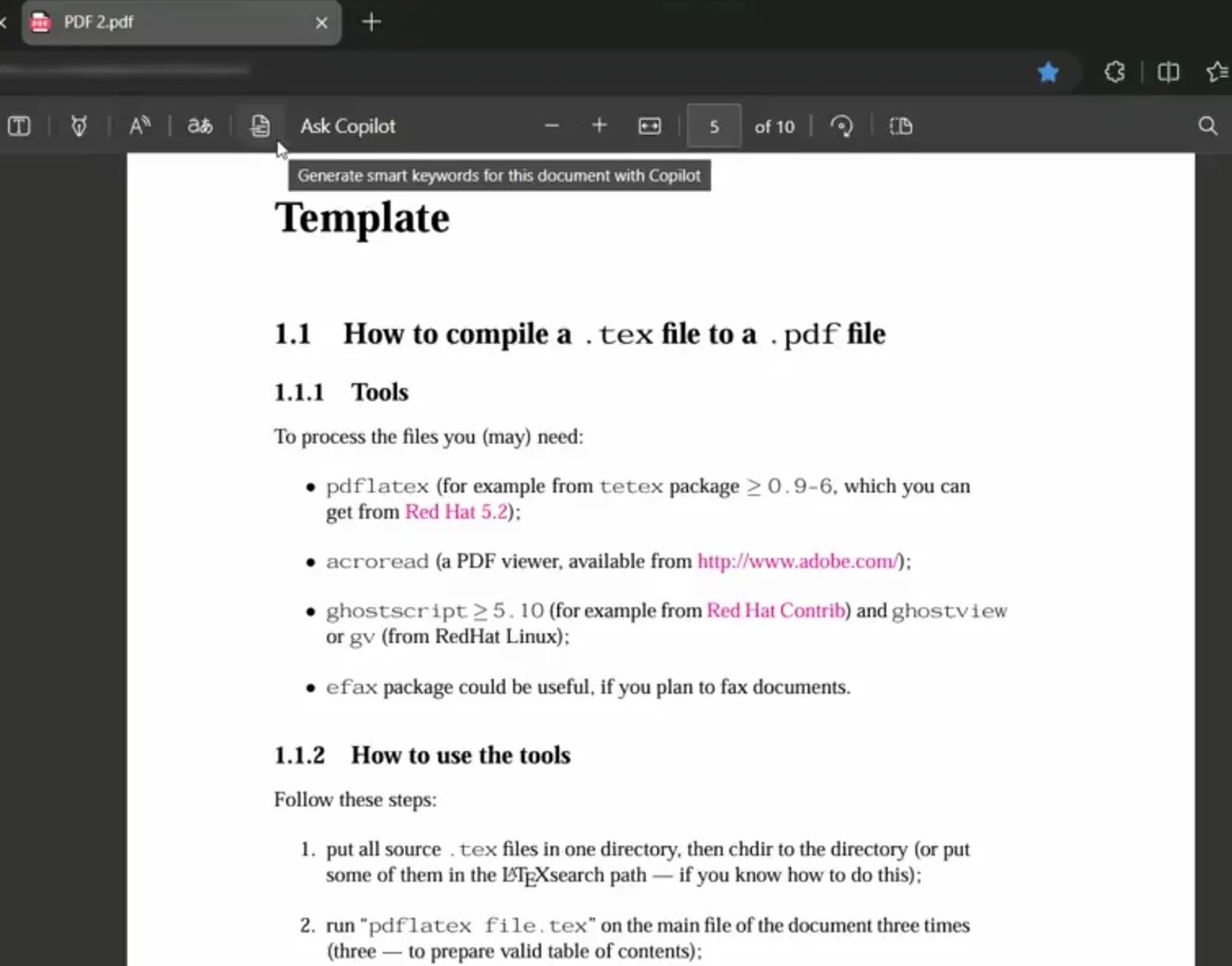
Another feature that will use AI will be the keyword generator in Edge's PDF reader, in Canary Microsoft has changed the icon for this feature and has also updated the tooltip which now mentions that these keywords will be generated with Copilot:https://t.co/idVlW4OgUj pic.twitter.com/Ra9f12duCY

— Leopeva64 (@Leopeva64) May 29, 2024

These keywords are like having a highlighter that knows exactly what’s important. They’re short phrases or terms that pop up in your document, pointing you straight to the most crucial content. No more endless scrolling or manual searching—Copilot’s got you covered.

How it works?

Open any PDF in Edge, and you’ll notice something new. Copilot doesn’t just summarize anymore; it highlights these smart keywords throughout the document. You can click on these keywords to dive deeper, with Copilot offering additional insights at every turn. It’s a streamlined way to get the information you need without the hassle.
Edge’s PDF reader gets a brain boost with Copilot
(Credit)

This feature is currently being tested in Edge Canary, where eagle-eyed browser researcher Leo spotted updates like a new icon and tooltip for the keyword generator. It’s a sign that Microsoft is serious about making Edge’s PDF reader not just functional, but powerful.

Coming soon?

While this smart keyword feature is still in the works, some users in the Edge Canary or Dev channels might already be enjoying it. For everyone else, the wait continues—but it’s clear that Microsoft is gearing up to make your PDF experience in Edge smarter and more efficient than ever before.

With Copilot leading the way, Edge’s PDF reader is transforming from a simple tool into a dynamic assistant, making sure you always have the most important information at your fingertips.


Featured image credit: Microsoft

Tags: AIcopilotEdgepdf
ShareTweet
Eray Eliaçık

Eray Eliaçık

Meet Eray, a tech enthusiast passionate about AI, crypto, gaming, and more. Eray is always looking into new developments, exploring unique topics, and keeping up with the latest trends in the industry.

Related Posts

Anthropic launches health features for Claude

Anthropic launches health features for Claude

12 January 2026
Google removes AI Overviews from medical queries

Google removes AI Overviews from medical queries

12 January 2026
Google introduces AI Inbox to organize Gmail tasks and updates

Google introduces AI Inbox to organize Gmail tasks and updates

9 January 2026
OpenAI announces ChatGPT Health feature

OpenAI announces ChatGPT Health feature

8 January 2026

LATEST

Xiaomi to launch fully self-developed smartphone in 2026

New WhatsApp parental controls will block strangers

Galaxy Unpacked 2026: S26 Ultra arrives just before MWC

Meta purges 550,000 Australian accounts to comply with under-16 ban

Simple ways to install and remove programs on Ubuntu

A guide to preventing accidental typing on Windows and Mac

Accessing your Google Chrome bookmarks

A guide to installing restricted extensions in Google Chrome

Anthropic launches health features for Claude

Google removes AI Overviews from medical queries

TechBriefly

© 2021 TechBriefly is a Linkmedya brand.

  • Tech
  • Business
  • Science
  • Geek
  • How to
  • About
  • Privacy
  • Terms
  • Contact
  • | Network Sites |
  • Digital Report
  • LeaderGamer

Follow Us

No Result
View All Result
  • Tech
  • Business
  • Crypto
  • Science
  • Geek
  • How to
  • About
    • About TechBriefly
    • Terms and Conditions
    • Privacy Policy
    • Contact Us
    • Languages
      • 中文 (Chinese)
      • Dansk
      • Deutsch
      • Español
      • English
      • Français
      • Nederlands
      • Italiano
      • 日本语 (Japanese)
      • 한국인 (Korean)
      • Norsk
      • Polski
      • Português
      • Pусский (Russian)
      • Suomalainen
      • Svenska