

Sing, hum, find! TikTok’s new melody-tastic trick is music to our ears: TikTok Sound Search. Do you feel like a broken record trying to remember the catchy song? Don’t worry, TikTok aims to save you from this search with a feature that hits all the right notes.
TikTok is testing a new feature called “Sound Search” in select regions. This tool allows users to find songs by singing, humming, or playing them. It’s designed to help users discover both popular songs and TikTok-specific sounds used in videos on the platform.

What is TikTok Sound Search
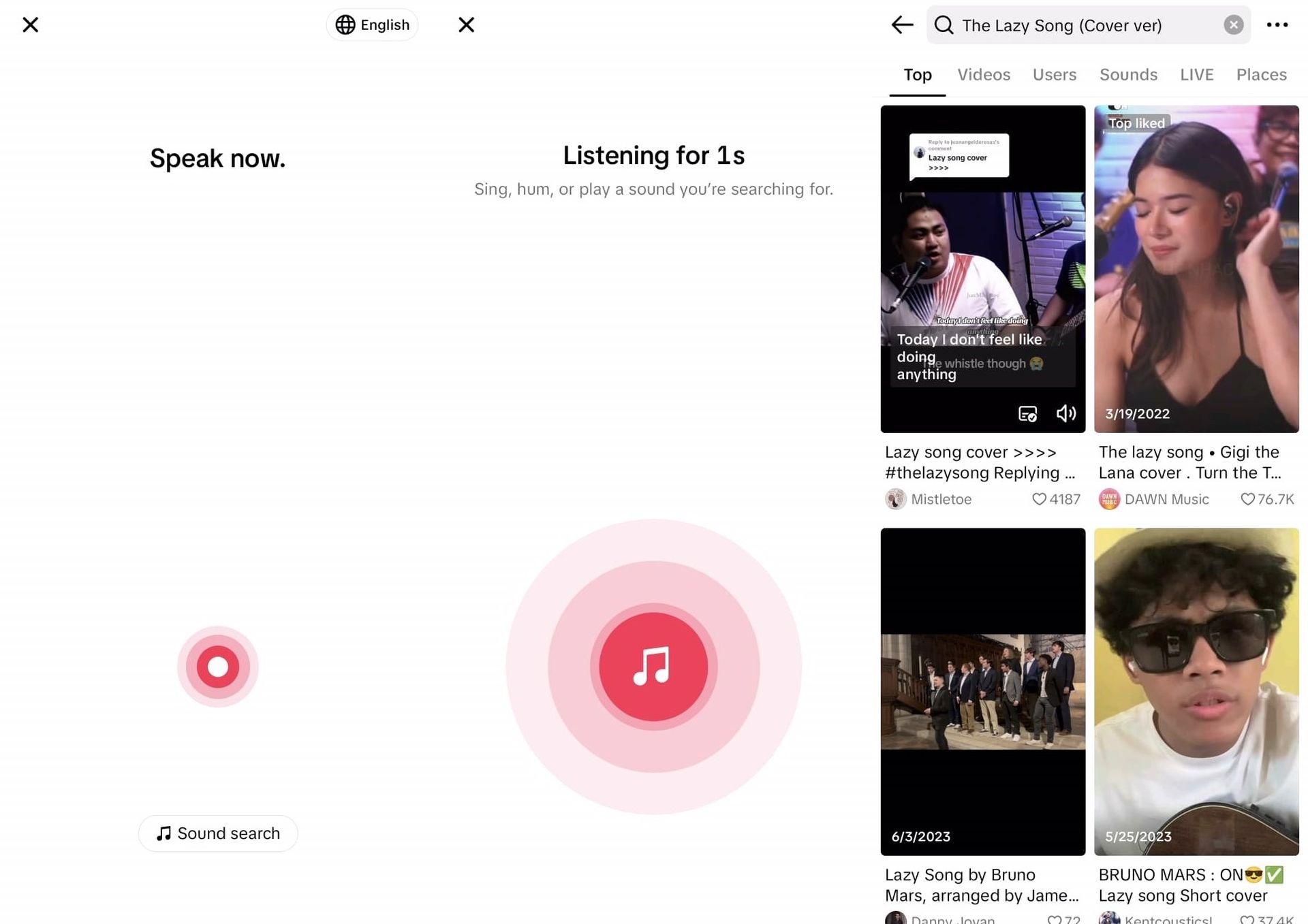
TikTok Sound Search works similarly to the features offered by YouTube Humming and Shazam. But TikTok’s version seems to want to take it a step further. While it can identify songs like its competitors, it also shows users videos on the platform that use those songs.
This feature seems to work best with popular songs and sounds often used in TikTok videos. For example, it quickly recognizes when you hum Bruno Mars’s “The Lazy Song” and shows videos that use the song or its remixes.
How to use TikTok Sound Search
To use Sound Search, users with access to the feature can:
- Open the TikTok app
- Go to the search bar
- Click the microphone icon
- Select “Sound Search”
- Sing, hum, or play the song they want to find
The tool then attempts to identify the song and show related videos.
Limitations and quirks
During testing, some limitations of the feature were noticed:
- It may struggle with less popular songs.
- Sometimes it identifies a song but doesn’t show related videos.
- It can recognize some TikTok-specific sounds and memes, despite being designed for songs.
TikTok hasn’t announced when this feature will be available to all users. However, its development shows TikTok’s focus on enhancing its search capabilities and keeping users engaged within the app.
TikTok Sound Search could potentially change how people discover music and trends on the app. It offers a new way to interact with the platform’s vast library of sounds and videos, making it easier for users to find and participate in trending content.
TikTok’s Sound Search is not its first test when it comes to crowd-pleasing features. Let’s take a walk down memory lane and revisit some of TikTok’s chart-topping songs. Remember when duets waltzed on stage?
This feature allowed users to create split-screen videos that matched the original content. Then there’s Stitch, which allows users to cut scenes from other videos and integrate them into their own. It was a mashup artist’s dream come true and sparked creativity left and right. And who can forget the green screen effect? It turned ordinary people into special effects wizards, transporting them to faraway lands or silly situations with just a tap. Finally, the “For You” page algorithm deserves a standing ovation. It’s like TikTok has a crystal ball, predicting what you’ll like before you even know it yourself.
These features didn’t appear overnight – they evolved by adapting to user feedback and behavior. The reason TikTok keeps users glued to their screens is because they are always hungry for the next big thing.
As the popular app looks to grow and evolve, features like TikTok Sound Search could play an important role in shaping how users interact with music and audio content on the platform. TikTok is particularly troubled by the issue of being banned in the USA.
Featured image credit: Kyle Wong / Unsplash