

Today we explain how to use Apple Pay Later? The iPhone’s digital wallet app, Apple Wallet, which also includes Apple Card and Apple Cash, is included with Apple Pay. Apple Card is a digital credit card offered by MasterCard and Goldman Sachs; Apple Cash is a peer-to-peer payment service; and Apple Pay allows you to save debit and credit cards electronically and make payments online or in physical places.
As more retailers accept payments from BNPL apps like Affirm, Klarna, and Afterpay, Apple’s debut into BNPL financing via Apple Pay Later is timely. While a handful of these apps provide longer installment plans with variable interest rates, the majority of them offer comparable short-term interest-free payment plans.
Check out all the new watchOS 9, tvOS 16, and iOS 16 features. Now let’s learn how to use Apple Pay Later.
HOT FIXES:
–iOS 16 Depth Effect not working: How to fix it?
–How to fix iOS 16 battery drain issue?
–Fix: iOS 16 keyboard haptics not working
–iPhone touchscreen not working on iOS 16: How to fix it easily?
Yes, the new mobile operating system of Apple is now out. Check out iOS 16 supported devices list to see if your iPhone can receive the new update. Apple brought some interesting tools with this update, discoved iOS 16 top features here! You might be asking yourself like: “Should I update to iOS 16 now or wait?” Well, we need to tell you that there are 9 hidden iOS 16 features you shouldn’t miss. You can also learn how to add widgets to the lock screen check out the best iOS 16 lock screen widgets by visiting our guides. This way you will learn how to customize lock screen on iOS 16. If you don’t like the search button, find out how to remove home screen search button in iOS 16.
How does Apple Pay Later work?
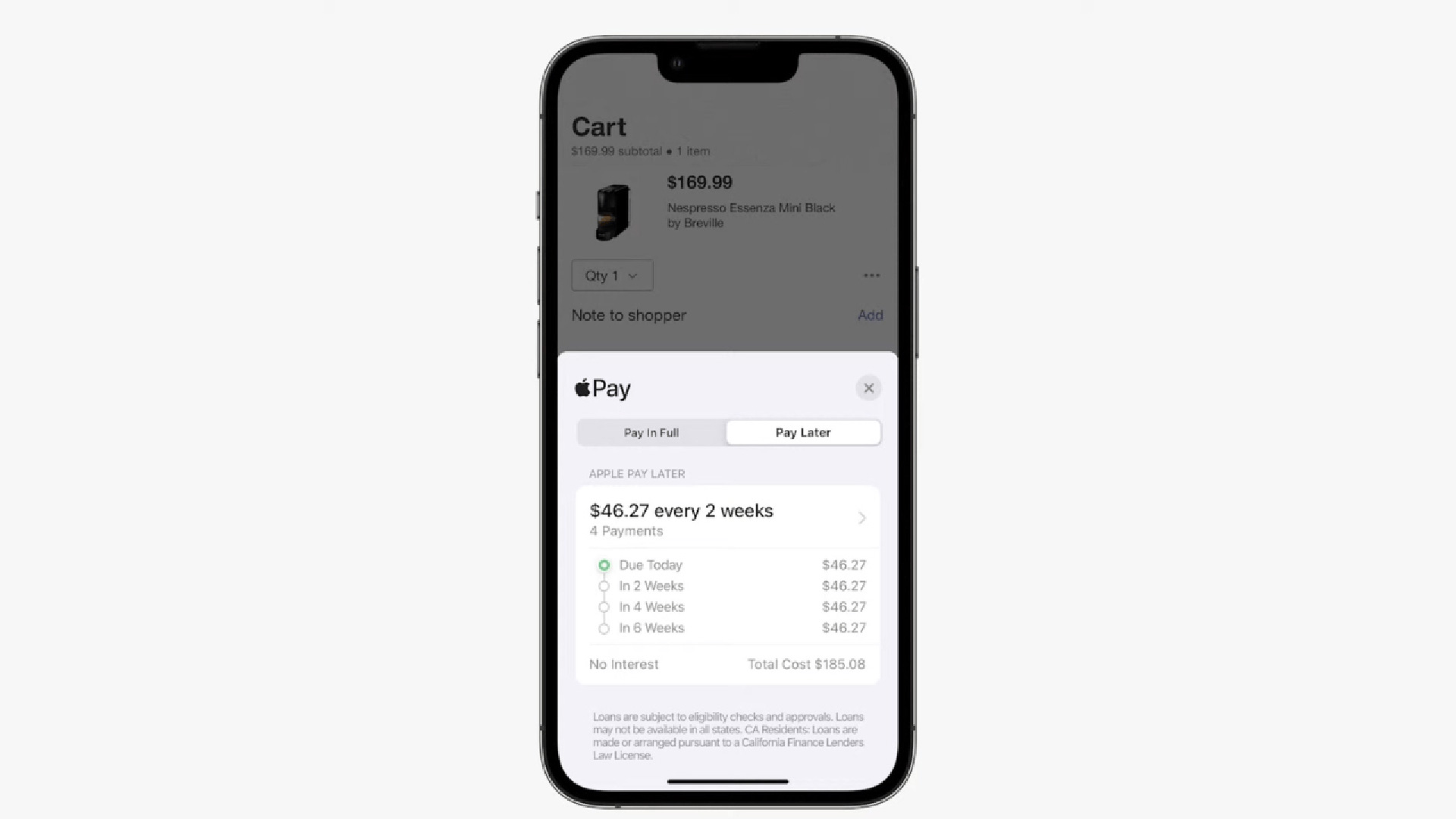
You can divide the cost of your purchases into four equal payments over the course of six weeks using Apple Pay Later. The initial payment is payable at the time of purchase, and subsequent payments are due every two weeks.
You’ll have two choices when making a purchase once Apple Pay Later is available: Pay in Full or Pay Later. The latter choice will display a payment schedule with the amounts and due dates for each of the four payments.
For businesses to accept payments with Apple Pay Later, no adjustments will need to be made. Transactions will proceed as usual; the only distinction will be in the manner of making back-end payments.
The white-label BNPL solution offered by the credit card firm, MasterCard Installments, will handle the Apple Pay Later merchant payments. Apple has established its own finance division, Apple Financial Services, which will be in charge of handling credit checks and loan applications. The formal loan issuer will be Goldman Sachs, a banking partner.
You cannot use a credit card to pay with Apple Pay Later; instead, you must use a debit card. Automatic payments can be set up, and you can always add to your existing payments. A soft credit check will be used to examine and approve or reject each BNPL purchase.
How to use Apple Pay Later?
With iOS 16, Apple’s most recent upgrade to its iPhone operating system, Apple Pay Later will be available. It’s not yet known if Apple Pay Later will be released alongside iOS 16 on September 12 or if it will be included in later point upgrades. iOS updates frequently, introducing new functions and removing bugs.
The fact that Apple Pay Later was not addressed at the Sept. 7 “Far Out” event for the general public suggests that iOS 16 won’t ship with the service at launch. Apple announced that Apple Pay Later would be live “sometime in the fall” at its WWDC presentation in June.
Every year, Apple releases its most recent mobile devices and operating systems at the same time. Preorders for the iPhone 14 have already started, and it will go on sale to the general public on Friday, September 16.
Both the Apple Card and Apple Pay Later are optional; neither service is exclusive to Apple products. According to Apple, as long as your debit card is linked to Apple Wallet, you can use Apple Pay Later to finance purchases. Additionally, Apple Pay Later’s six-week interest-free installment period is substantially shorter than the payment schedules provided by Apple Card Monthly Installments.
How are Apple Pay Later and Apple Card Monthly Installments different from one another?
Using the Apple Card credit card and a program called Apple Card Monthly Installments, you can finance the purchase of some Apple products. The product determines how long the 0% APR period lasts for certain purchases. Six months to two years are covered by the installment plans.
This way you’ve learned how to use Apple Pay Later on iOS 16. If you liked this article, we recommend you to check our guides explaining how to use iOS 16 keyboard haptics and how to edit messages on iPhone. Don’t miss our iOS 16 duplicate photos guide if you are dealing with a lot of photos that look like each other.


