

TechBriefly
  • Tech
  • Business
  • Crypto
  • Science
  • Geek
  • How to
  • About
    • About TechBriefly
    • Terms and Conditions
    • Privacy Policy
    • Contact Us
    • Languages
      • 中文 (Chinese)
      • Dansk
      • Deutsch
      • Español
      • English
      • Français
      • Nederlands
      • Italiano
      • 日本语 (Japanese)
      • 한국인 (Korean)
      • Norsk
      • Polski
      • Português
      • Pусский (Russian)
      • Suomalainen
      • Svenska
No Result
View All Result
TechBriefly
Home How to
How to change your birthday on TikTok in 2022?

How to change your birthday on TikTok in 2022?

If you are wondering how to change your birthday on TikTok, you have come to the right place.

Önder ErdinebyÖnder Erdine
16 July 2022
in How to
Reading Time: 2 mins read
Share on FacebookShare on Twitter

In this article, we are going to be going over how to change your birthday on TikTok, so you can correct the age displayed on your profile.

TikTok, a social networking and video-sharing website, curates films for its members depending on a variety of characteristics, including age. TikTok’s popularity skyrocketed last year, with the app being one of the most downloaded applications of 2020. Many of the platform’s hundreds of millions of active users are under the age of 18, raising privacy issues for kids, despite the fact that the app’s “full TikTok experience” is aimed at users 13 and over, according to its safety center.

In this article, we are going to be going over how to change your birthday on TikTok, so you can correct the age displayed on your profile.
How to change your birthday on TikTok in 2022?

In 2021, TikTok strengthened its privacy settings, making all accounts under the age of 16 private and eliminating the option to modify your birth date within the app after your age was established. If your TikTok date of birth is incorrect, you’ll need to contact the app’s customer service team.
In this article, we are going to be going over how to change your birthday on TikTok, so you can correct the age displayed on your profile.
How to change your birthday on TikTok in 2022?

How to change your birthday on TikTok?

If you put your age wrongly in the TikTok app and want to amend it without creating a new account, you may email TikTok at infocontact@tiktok.com or contact the platform’s customer support staff via the app’s Support section, as outlined below.

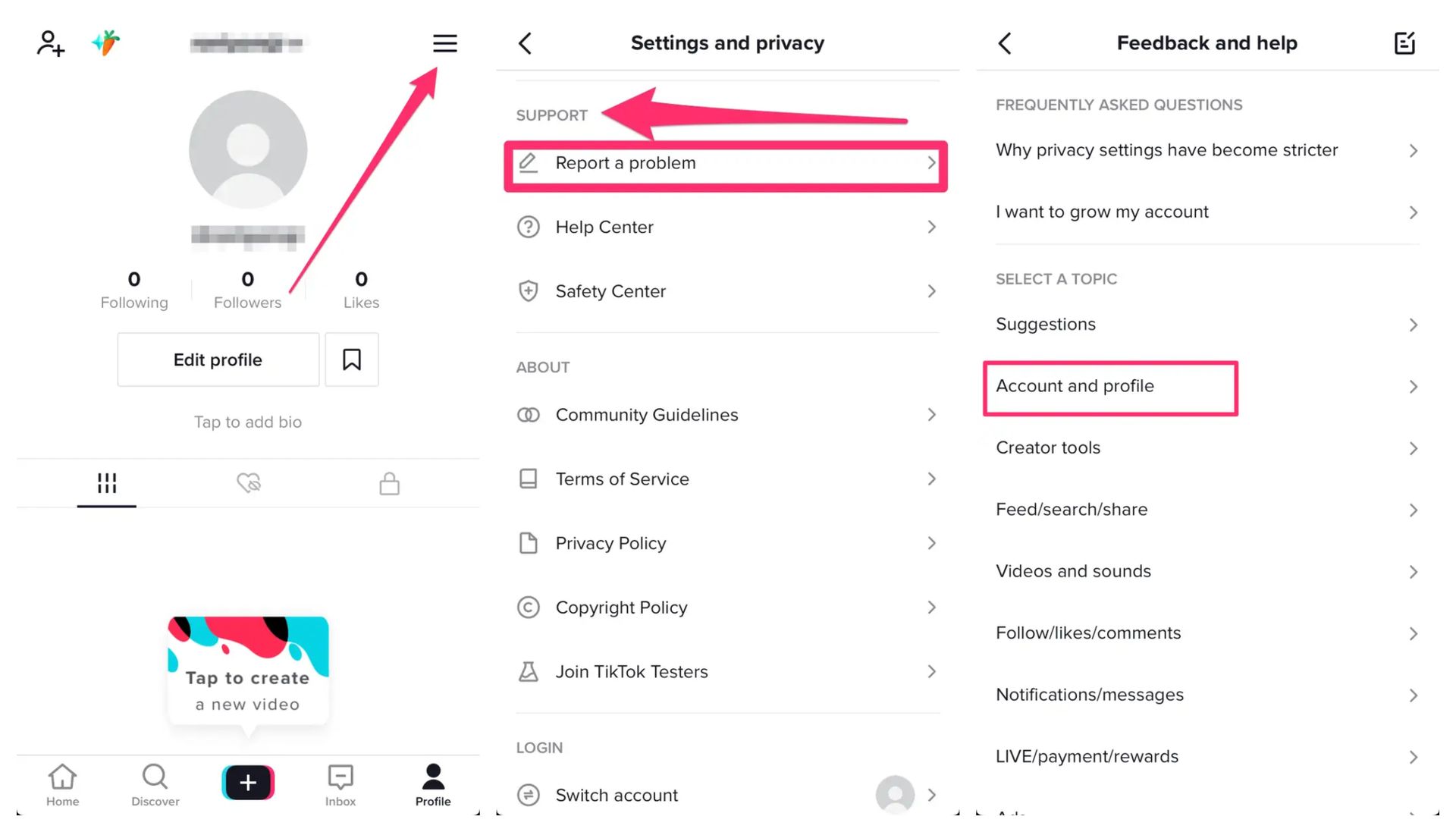
  • Launch the TikTok iPhone or Android app.
  • At the bottom right of the home screen, tap on Profile.
  • Tap on the three horizontal lines in the upper-right corner.
  • This will take you to the Privacy and Settings page. Scroll down until you reach the Support area, then hit Report a Problem.
In this article, we are going to be going over how to change your birthday on TikTok, so you can correct the age displayed on your profile.
How to change your birthday on TikTok in 2022?
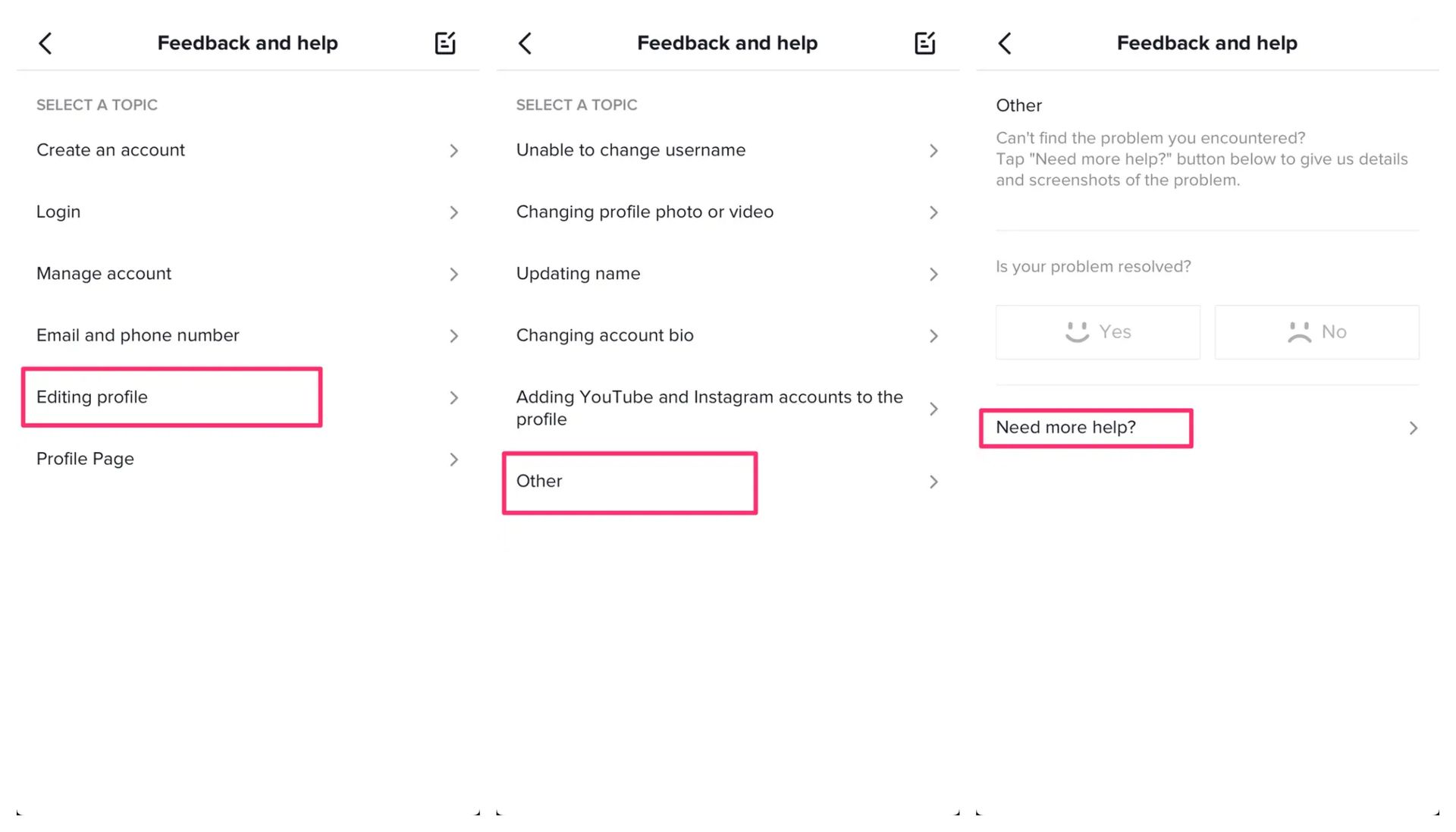
  • Choose Account and Profile.
  • Select Editing profile.
  • Choose Other.
  • Then, select Need more help? option.
  • This will take you to a feedback page where you may write a text message requesting that an incorrect date of birth on your account be changed.
In this article, we are going to be going over how to change your birthday on TikTok, so you can correct the age displayed on your profile.
How to change your birthday on TikTok in 2022?

A TikTok customer service person will then contact you through email at the email address linked with your account. In order to make the adjustment, you will most likely need to give some kind of government-issued documentation in that communication to validate your identity and date of birth.

We hope that you enjoyed this article on how to change your birthday on TikTok. If you did, you might also like to check out our other articles, such as Minions movie TikTok trend is being banned by cinemas, or what is the biggest cult on TikTok.

Tags: guidehow toTikTok
ShareTweet
Önder Erdine

Önder Erdine

Related Posts

How to gain full control by jailbreaking iPhone and rooting Android

How to gain full control by jailbreaking iPhone and rooting Android

19 January 2026
How to create folders and add widgets on Android

How to create folders and add widgets on Android

19 January 2026
How to tell if your iPhone or Android phone is carrier unlocked

How to tell if your iPhone or Android phone is carrier unlocked

16 January 2026
How to apply screen protectors without air bubbles

How to apply screen protectors without air bubbles

16 January 2026

LATEST

Nvidia Rubin GPUs: 200 teraFLOPS FP64 from software emulation

Walmart maintains Apple Pay blockade across US stores for 2026

Musk demands $134 billion from OpenAI and Microsoft for wrongful gains

Apple shifts iOS 27 focus to quality and underlying performance

Google integrates Wallet and Tasks into Pixel 10 Magic Cue

Threads overtakes X with 141.5M mobile users

Microsoft issues emergency fix for Windows 11 shutdown bugs

How to gain full control by jailbreaking iPhone and rooting Android

How to create folders and add widgets on Android

OpenAI rockets $250 million into Altman’s Merge Labs brain-AI bridge

TechBriefly

© 2021 TechBriefly is a Linkmedya brand.

  • Tech
  • Business
  • Science
  • Geek
  • How to
  • About
  • Privacy
  • Terms
  • Contact
  • | Network Sites |
  • Digital Report
  • LeaderGamer

Follow Us

No Result
View All Result
  • Tech
  • Business
  • Crypto
  • Science
  • Geek
  • How to
  • About
    • About TechBriefly
    • Terms and Conditions
    • Privacy Policy
    • Contact Us
    • Languages
      • 中文 (Chinese)
      • Dansk
      • Deutsch
      • Español
      • English
      • Français
      • Nederlands
      • Italiano
      • 日本语 (Japanese)
      • 한국인 (Korean)
      • Norsk
      • Polski
      • Português
      • Pусский (Russian)
      • Suomalainen
      • Svenska