

TechBriefly
  • Tech
  • Business
  • Crypto
  • Science
  • Geek
  • How to
  • About
    • About TechBriefly
    • Terms and Conditions
    • Privacy Policy
    • Contact Us
    • Languages
      • 中文 (Chinese)
      • Dansk
      • Deutsch
      • Español
      • English
      • Français
      • Nederlands
      • Italiano
      • 日本语 (Japanese)
      • 한국인 (Korean)
      • Norsk
      • Polski
      • Português
      • Pусский (Russian)
      • Suomalainen
      • Svenska
No Result
View All Result
TechBriefly
Home How to
You can listen to Spotify using the old iPod Classic interface: How to do it?

You can listen to Spotify using the old iPod Classic interface: How to do it?

Kerem GülenbyKerem Gülen
29 June 2021
in How to
Reading Time: 1 min read
Share on FacebookShare on Twitter

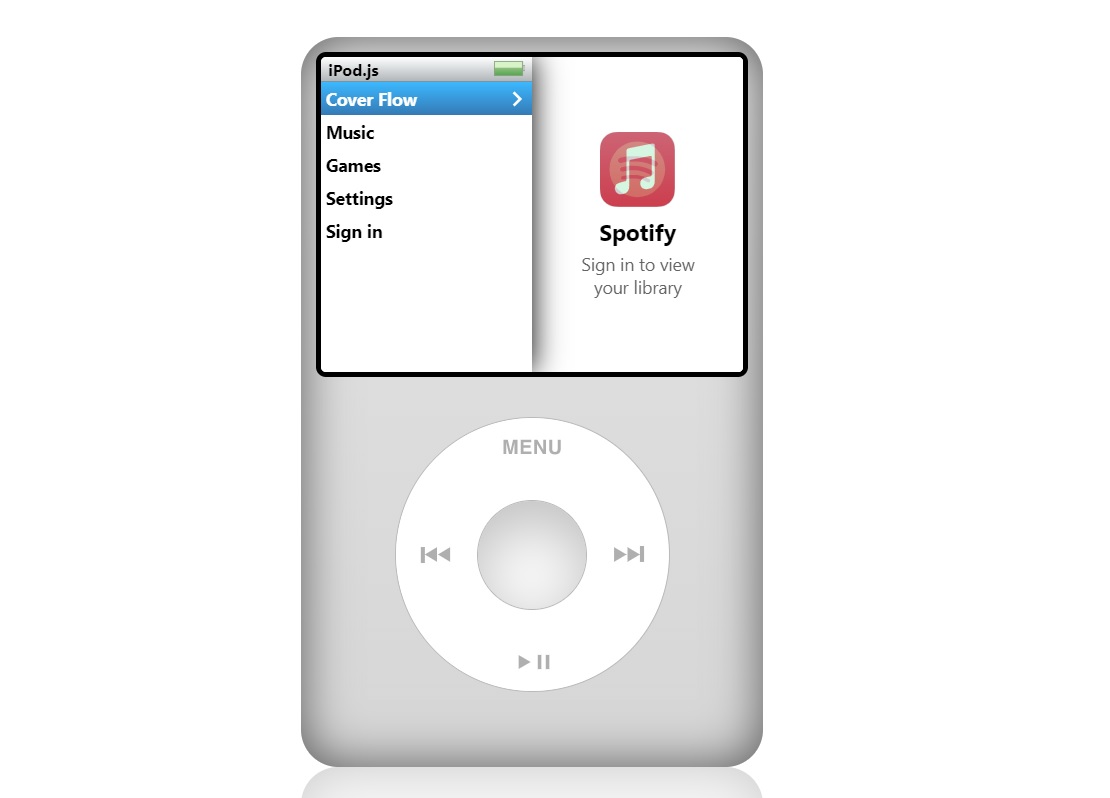
Did you know that you can listen to Spotify using the old iPod Classic interface, well we are going to show you how to do it. The iPod Classic is still the favorite music player for some people, with wheel controls that many of us miss on today’s iPhone. That is why a developer named Taner Villarete has created that website that will let you enjoy the nostalgic experience of the iPod.

This is a project to play music from Spotify and Apple Music using the iPod Classic interface. Let’s tell you how it works.

How to listen to Spotify using the old iPod Classic interface?

iPod.js is a website very well optimized for the iPhone, although it also works on PC. It has integrated Spotify and Apple Music APIs, so we can use them with both streaming services. It is an open-source project and its code can be found on GitHub.

The player, works both on mobile phone and PC, although the controls work more naturally on mobile phone because it is in vertical format. We can access our library, list of artists, and even access the classic Cover Flow view.

You can listen to Spotify using the old iPod Classic interface: How to do it?
How to listen to Spotify using the old iPod Classic interface?

The operation is spectacular, and it is very fluid, with animations faithful to the iPod. It is a return to the past to enjoy the iPod experience using an iPhone.

The best part is you can use this website for free and it does not have ads of any kind.

Tags: AndroidApple Musicguidehow tointerfaceiPhoneSpotifystep by stepstreamingtutorial
ShareTweet
Kerem Gülen

Kerem Gülen

Kerem from Turkey has an insatiable curiosity for the latest advancements in tech gadgets and a knack for innovative thinking.With 3 years of experience in editorship and a childhood dream of becoming a journalist, Kerem has always been curious about the latest tech gadgets and is constantly seeking new ways to create.As a Master's student in Strategic Communications, Kerem is eager to learn more about the ever-evolving world of technology. His primary focuses are artificial intelligence and digital inclusion, and he delves into the most current and accurate information on these topics.

Related Posts

How to install mods and custom content in The Sims 2

How to install mods and custom content in The Sims 2

26 December 2025
Running Python files and fixing path errors on Windows

Running Python files and fixing path errors on Windows

26 December 2025
How to boot your PC into Command Prompt for troubleshooting

How to boot your PC into Command Prompt for troubleshooting

26 December 2025
How to delete a virus using Command Prompt

How to delete a virus using Command Prompt

26 December 2025
Please login to join discussion

LATEST

New WhatsApp update brings 2026 stickers and video call effects

Leaker reveals Xiaomi plans for high end eSIM device in 2026

HP prepares OMEN OLED monitor reveal for CES 2026

High RAM costs from AI boom could delay next Xbox and PlayStation

LG to unveil its Gallery TV at CES 2026

Bitcoin drops 3% to $87,300 as altcoins decline

How to install mods and custom content in The Sims 2

Running Python files and fixing path errors on Windows

How to boot your PC into Command Prompt for troubleshooting

How to delete a virus using Command Prompt

TechBriefly

© 2021 TechBriefly is a Linkmedya brand.

  • Tech
  • Business
  • Science
  • Geek
  • How to
  • About
  • Privacy
  • Terms
  • Contact
  • | Network Sites |
  • Digital Report
  • LeaderGamer

Follow Us

No Result
View All Result
  • Tech
  • Business
  • Crypto
  • Science
  • Geek
  • How to
  • About
    • About TechBriefly
    • Terms and Conditions
    • Privacy Policy
    • Contact Us
    • Languages
      • 中文 (Chinese)
      • Dansk
      • Deutsch
      • Español
      • English
      • Français
      • Nederlands
      • Italiano
      • 日本语 (Japanese)
      • 한국인 (Korean)
      • Norsk
      • Polski
      • Português
      • Pусский (Russian)
      • Suomalainen
      • Svenska