
TechBriefly
  • Tech
  • Business
  • Crypto
  • Science
  • Geek
  • How to
  • About
    • About TechBriefly
    • Terms and Conditions
    • Privacy Policy
    • Contact Us
    • Languages
      • 中文 (Chinese)
      • Dansk
      • Deutsch
      • Español
      • English
      • Français
      • Nederlands
      • Italiano
      • 日本语 (Japanese)
      • 한국인 (Korean)
      • Norsk
      • Polski
      • Português
      • Pусский (Russian)
      • Suomalainen
      • Svenska
No Result
View All Result
TechBriefly
Home Tech Software
Microsoft announces Windows 10 May 2021 Update

Microsoft announces Windows 10 May 2021 Update

Barış SelmanbyBarış Selman
30 April 2021
in Software, Tech
Reading Time: 2 mins read
Share on FacebookShare on Twitter

Microsoft announces Windows 10 May 2021 Update: The spring update can now be tested. We are waiting for the release of the Windows 10 May update and at the gates of its launch Microsoft has announced that the update will be called Windows 10 May 2021 Update is already available for test channels through the 19043.928 builds that can already be downloaded.

The update of Windows 10 in spring will be officially called Windows 10 May 2021 Update and everything indicates that it will come with very few new features, reserving the bulk of the changes for the big update that we expect in the second part of the year.

Everything indicates that build 19043.928 will probably be the final version (RTM or Release To Market) and that it will be the one used for the update. In fact, along with it, they have also made available the updated ISO images for download and subsequent installation.

Microsoft announces Windows 10 May 2021 Update: The spring update can now be tested

They warn that they will continue with the update process with the usual service cadence and thus users of the Windows Insider Program in the Beta and Release Preview channels will have access to the latest build for the 21H1 branch early next week with the release of build 19043.964.

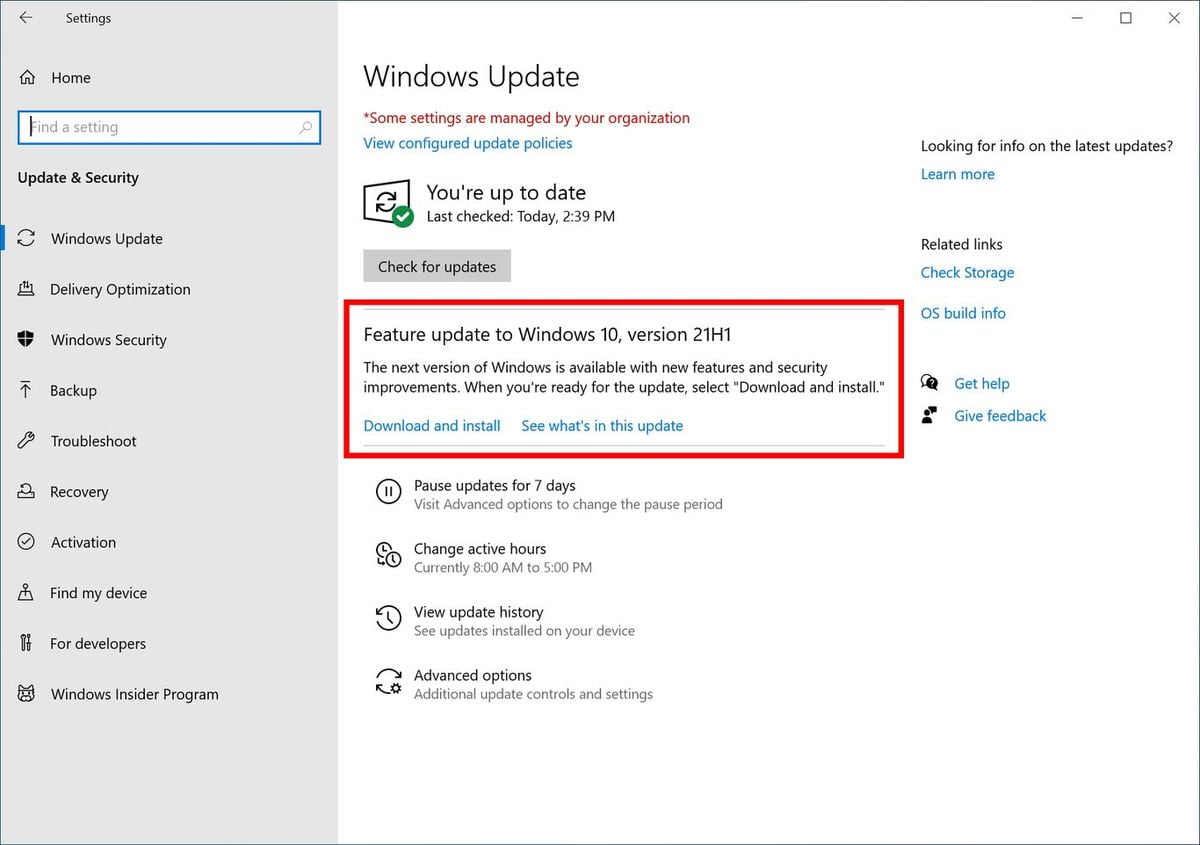
They also indicate that the May 2021 update will be offered to those in the Release Preview channel via the “finder” in Windows Update, at least initially. Those interested in having the update should go to Settings > Update and security > Windows Update and choose to download and install 21H1. Once the computer has been updated to Windows 10 May 2021 Update, users will continue to automatically receive new service updates through Windows Update, including build 19043.964.

Windows 10 May 2021 Update will be a light update. With changes already seen such as rounded corners or a new taskbar, we will have to wait for the second update of the year, in autumn, to be able to access a greater number of improvements.

Tags: AnnouncesMicrosoftsoftwaretechnologyupdate
ShareTweet
Barış Selman

Barış Selman

A technology and gaming enthusiast by day, Barış is a passionate composer and black/death metal guitarist by night. He keeps his finger on the pulse of the intersection of art and technology whenever he can from his tours worldwide.

Related Posts

New WhatsApp update brings 2026 stickers and video call effects

New WhatsApp update brings 2026 stickers and video call effects

30 December 2025
Leaker reveals Xiaomi plans for high end eSIM device in 2026

Leaker reveals Xiaomi plans for high end eSIM device in 2026

30 December 2025
HP prepares OMEN OLED monitor reveal for CES 2026

HP prepares OMEN OLED monitor reveal for CES 2026

30 December 2025
High RAM costs from AI boom could delay next Xbox and PlayStation

High RAM costs from AI boom could delay next Xbox and PlayStation

30 December 2025
Please login to join discussion

LATEST

New WhatsApp update brings 2026 stickers and video call effects

Leaker reveals Xiaomi plans for high end eSIM device in 2026

HP prepares OMEN OLED monitor reveal for CES 2026

High RAM costs from AI boom could delay next Xbox and PlayStation

LG to unveil its Gallery TV at CES 2026

Bitcoin drops 3% to $87,300 as altcoins decline

How to install mods and custom content in The Sims 2

Running Python files and fixing path errors on Windows

How to boot your PC into Command Prompt for troubleshooting

How to delete a virus using Command Prompt

TechBriefly

© 2021 TechBriefly is a Linkmedya brand.

  • Tech
  • Business
  • Science
  • Geek
  • How to
  • About
  • Privacy
  • Terms
  • Contact
  • | Network Sites |
  • Digital Report
  • LeaderGamer

Follow Us

No Result
View All Result
  • Tech
  • Business
  • Crypto
  • Science
  • Geek
  • How to
  • About
    • About TechBriefly
    • Terms and Conditions
    • Privacy Policy
    • Contact Us
    • Languages
      • 中文 (Chinese)
      • Dansk
      • Deutsch
      • Español
      • English
      • Français
      • Nederlands
      • Italiano
      • 日本语 (Japanese)
      • 한국인 (Korean)
      • Norsk
      • Polski
      • Português
      • Pусский (Russian)
      • Suomalainen
      • Svenska
