

TechBriefly
  • Tech
  • Business
  • Crypto
  • Science
  • Geek
  • How to
  • About
    • About TechBriefly
    • Terms and Conditions
    • Privacy Policy
    • Contact Us
    • Languages
      • 中文 (Chinese)
      • Dansk
      • Deutsch
      • Español
      • English
      • Français
      • Nederlands
      • Italiano
      • 日本语 (Japanese)
      • 한국인 (Korean)
      • Norsk
      • Polski
      • Português
      • Pусский (Russian)
      • Suomalainen
      • Svenska
No Result
View All Result
TechBriefly
Home How to
An unknown error causes black screen and restarts Samsung Galaxy S20

An unknown error causes black screen and restarts Samsung Galaxy S20

Rafi PrattbyRafi Pratt
23 May 2020
in How to, Smartphones, Tech
Reading Time: 2 mins read
Share on FacebookShare on Twitter

Today, Some Samsung users reported that they are starting to experience an unknown error that causes black screen and restart in Samsung Galaxy S series including the Galaxy S20.

Many Samsung users have shared black screens of their devices on Weibo, Chinese social media platform, and are facing major reboot problems. Moreover, not only old devices are affected by the problem.

The affected devices include S8, S9, S10 and even S20 models. The screen lock problem is thought to be caused by the lunar calendar. For now, it is recommended to turn off automatic updating, set the date to another date, turn off automatic updates and wait for official repair instructions from the company.

An unknown error causes black screen and restarts Samsung Galaxy S20 how to solve and fixjpg

The cause of the black screen error in Samsung Galaxy S20 and other devices

According to the claims in some blog posts, the reason for the crashes of some Samsung models experienced is that the old version of the screen lock application. This app causes an error in April of the Chinese calendar. Some users claim that they experienced errors and crashes on their Samsung phones.

Of course, the reason for these problems is currently unknown. If you have started to experience such a problem on your Samsung device, the workarounds suggested for the error are as follows…
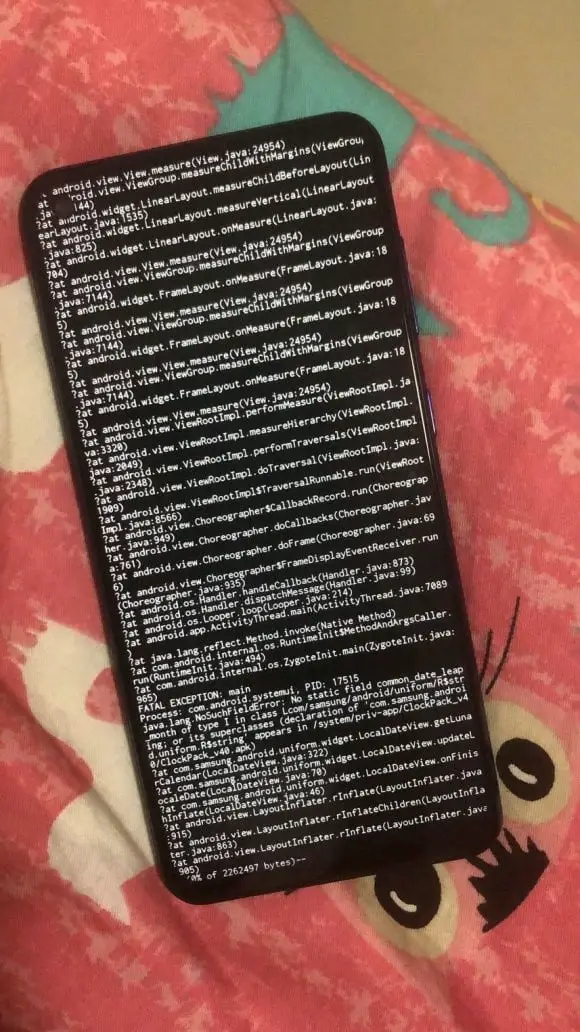
An unknown error causes black screen and restarts Samsung Galaxy S20 how to solve and fixjpg

How to fix black screen problem on Samsung Galaxy phones?

There are two solutions to the black screen problem on Samsung Galaxy phones including S20 for now.

Solution 1

  • Turn off automatic updates (turn off “automatic download over WLAN”
  • Back up phone data
  • Change reboot entry on desktop to May 1

Solution 2

  • Restart the phone
  • Press the power key twice to turn on the camera
  • Open the camera settings in the upper left corner
  • Pull down the notification bar to enter settings
  • Find the lock screen, click it and click ‘about screen lock’, then update

In the statement made by Samsung Galaxy ‘s official Weibo account, it was stated that they received the feedback on the system problems, the cause of the error was investigated and a suitable solution will be offered as soon as possible.

Tags: errorGalaxy S20how torestartSamsungsolution
ShareTweet
Rafi Pratt

Rafi Pratt

Related Posts

New WhatsApp update brings 2026 stickers and video call effects

New WhatsApp update brings 2026 stickers and video call effects

30 December 2025
Leaker reveals Xiaomi plans for high end eSIM device in 2026

Leaker reveals Xiaomi plans for high end eSIM device in 2026

30 December 2025
HP prepares OMEN OLED monitor reveal for CES 2026

HP prepares OMEN OLED monitor reveal for CES 2026

30 December 2025
High RAM costs from AI boom could delay next Xbox and PlayStation

High RAM costs from AI boom could delay next Xbox and PlayStation

30 December 2025
Please login to join discussion

LATEST

New WhatsApp update brings 2026 stickers and video call effects

Leaker reveals Xiaomi plans for high end eSIM device in 2026

HP prepares OMEN OLED monitor reveal for CES 2026

High RAM costs from AI boom could delay next Xbox and PlayStation

LG to unveil its Gallery TV at CES 2026

Bitcoin drops 3% to $87,300 as altcoins decline

How to install mods and custom content in The Sims 2

Running Python files and fixing path errors on Windows

How to boot your PC into Command Prompt for troubleshooting

How to delete a virus using Command Prompt

TechBriefly

© 2021 TechBriefly is a Linkmedya brand.

  • Tech
  • Business
  • Science
  • Geek
  • How to
  • About
  • Privacy
  • Terms
  • Contact
  • | Network Sites |
  • Digital Report
  • LeaderGamer

Follow Us

No Result
View All Result
  • Tech
  • Business
  • Crypto
  • Science
  • Geek
  • How to
  • About
    • About TechBriefly
    • Terms and Conditions
    • Privacy Policy
    • Contact Us
    • Languages
      • 中文 (Chinese)
      • Dansk
      • Deutsch
      • Español
      • English
      • Français
      • Nederlands
      • Italiano
      • 日本语 (Japanese)
      • 한국인 (Korean)
      • Norsk
      • Polski
      • Português
      • Pусский (Russian)
      • Suomalainen
      • Svenska
